
The Vision
Cricket generates an enormous amount of granular data — every single ball bowled carries runs, extras, wickets, fielders, and player identities. Cricsheet makes this data freely available as one deeply nested JSON file per match, covering Test, ODI, and T20 cricket. That's a gift for analysts — and a challenge for engineers. Nested arrays of innings, overs, and deliveries; player registries keyed by shifting names; venues written a dozen different ways across seasons — turning this into clean, queryable, trustworthy tables requires more than a notebook and a prayer.
This project builds a fully governed Data Lakehouse on Databricks to solve that problem: ingest raw Cricsheet JSON as it lands, enforce structure and quality through a Medallion Architecture, and expose curated gold tables ready for player performance analysis, venue insights, and home-vs-away team form — all backed by Delta Lake and governed through Unity Catalog.
Medallion Architecture
The platform follows the classic Bronze → Silver → Gold layering, moving data from raw and messy to curated and analytics-ready:
Cricsheet JSON files
        ↓
    BRONZE
  matches_raw (raw JSON, 1 row per file)
        ↓
    SILVER
  matches         — match metadata
  players         — SCD Type 2 player registry
  match_players   — squad per match
  deliveries      — ball-by-ball data
  player_roles    — player role/style (seed data)
  dim_venues      — venue canonical mapping (seed data)
        ↓
    GOLD
  player_batting_stats      — career batting statistics
  player_bowling_stats      — career bowling statistics
  match_summary             — innings-level match summary
  match_venues               — match venue enriched data
  players                    — enriched player profiles
  home_away_performance      — win % by home/away/neutral
Every layer earns its place: Bronze preserves raw fidelity for replay and debugging, Silver normalizes structure and applies history-aware modeling, and Gold pre-aggregates the metrics analysts actually query.
Tech Stack
The stack is intentionally lean — everything is native to the Databricks platform, with no external orchestrators or bolt-on tools:
- Platform: Databricks (Free Edition)
- Storage: Delta Lake — ACID transactions, schema evolution, time travel
- Governance: Unity Catalog — table-level access control and lineage
- Compute/Language: PySpark + SQL
- Orchestration: Lakeflow Jobs with file-arrival triggers
- Infrastructure as Code: Databricks Asset Bundles (DABs) for dev/prod parity
- Source control: GitHub
- Data source: Cricsheet JSON (Test, ODI, T20 ball-by-ball data)
Bronze: Taming Nested JSON with Auto Loader
Rather than parsing JSON structure at ingestion time, the Bronze layer takes a deliberately simple approach: land each match file as a single opaque row of text, and defer all parsing to Silver. Auto Loader streams new files as they arrive in a Unity Catalog Volume, using the wholetext option so that an entire match file becomes one row:
df = (spark.readStream
    .format('cloudFiles')
    .option('cloudFiles.format', 'text')
    .option('wholetext', 'true')          # entire file = 1 row
    .option('cloudFiles.schemaLocation', checkpoint_path)
    .load(source_path)
)
Each row is stamped with file_path, ingestion_timestamp, and a match_id extracted straight from the filename via regex. This raw-first pattern means messy or evolving JSON never breaks the ingestion job — schema drift is a Silver-layer problem, not a Bronze-layer outage. The stream runs with trigger(availableNow=True), processing everything currently available and then stopping — ideal for a file-arrival-triggered job rather than an always-on stream.
Silver: SCD Type 2 Players & Ball-by-Ball Grain
Silver is where the real transformation happens, and two design decisions stand out.
Players as SCD Type 2. Cricketers change registered names across a career (marriages, transliterations, board corrections), but historical scorecards should still resolve to the same player. The silver.players table tracks this properly: each player's most recent name per match date is extracted from the registry, and on every run the pipeline diffs incoming names against is_current = true records. Brand-new player IDs are inserted directly; players whose name changed have their old row expired (effective_to = current_date(), is_current = false) and a new current row inserted — a textbook SCD Type 2 merge implemented with DeltaTable.update() plus targeted appends.
Deliveries at true ball-by-ball grain. The silver.deliveries table explodes the nested JSON three levels deep — innings → overs → deliveries — using posexplode to preserve 1-based innings, over, and ball numbers, then flattens batter, bowler, runs, extras, and wicket details per ball. Derived flags (is_wicket, is_boundary, is_four, is_six, delivery_type) are computed once here so every downstream Gold table can aggregate without re-deriving logic. Batter, bowler, and fielder names are resolved to stable player_ids by joining against current SCD rows only — ensuring stats attribute correctly even when a player's registered name has changed since the match was played.
Gold: Analytics-Ready Tables
Gold tables answer specific analytical questions directly, so BI tools and notebooks never need to re-derive business logic:
- player_batting_stats: runs, balls faced, fours, sixes, dot balls, strike rate, and boundary percentage per innings — joined against dismissal details to attribute wickets to the correct bowler and fielder.
- player_bowling_stats: wickets, economy, and bowling figures aggregated from the same delivery-level source of truth.
- match_summary and match_venues: innings-level scorecards enriched with canonical venue metadata.
- home_away_performance: perhaps the most interesting table — it infers each team's home country from the venues they play at most often, then classifies every match as
home,away, orneutraland rolls up win/loss/draw percentages by team and match type.
All Gold tables are built as pure SQL CREATE TABLE ... AS statements over Silver — declarative, easy to review, and trivial to rebuild from scratch since Silver is the durable source of truth.
Orchestration with Lakeflow Jobs
Three Lakeflow Jobs orchestrate the platform, each defined as YAML in resources/ and deployed via DABs — no external scheduler required:
Main Pipeline (triggered on new match JSON arrival)
bronze_ingestion
      ↓
silver_matches — silver_players — silver_deliveries — silver_match_players
      ↓
gold_batting_stats — gold_bowling_stats — gold_match_summary — gold_players
      ↓
gold_match_venues — gold_home_away_performance

Player Roles Pipeline (triggered on new CSV seed arrival)
silver_player_roles → gold_players

Venues Pipeline (triggered on new CSV seed arrival)
silver_venues → silver_matches
Each job uses a file-arrival trigger — the pipeline runs automatically the moment new Cricsheet JSON or seed CSVs land in the Volume, with no polling or cron guesswork. Task-level depends_on declarations encode the DAG explicitly, so Gold tables only build once every Silver dependency they read from has refreshed.
Governance: Unity Catalog & Delta Lake
Every table in this project is a Unity Catalog managed table backed by Delta Lake — a deliberate choice over DBFS mounts or manual storage paths:
- No path management: Unity Catalog decides where files live; there's no mount configuration or path-collision risk.
- Governed access: permissions are managed at catalog, schema, and table level, bootstrapped in
00_catalog_setupand01_catalog_permissions. - Delta Lake features for free: ACID transactions,
mergeSchemafor graceful evolution, time travel for auditing, and nativeMERGE/UPDATEsupport for the SCD Type 2 player history. - Separate dev and prod catalogs (
cricket_dev,cricket_prod) keep environments cleanly isolated while sharing identical pipeline logic.
Infrastructure as Code with Databricks Asset Bundles
The entire bundle — jobs, triggers, task graphs, and environment variables — is defined as code in databricks.yml and deployed with the Databricks CLI:
databricks bundle validate
databricks bundle deploy --target dev
databricks bundle deploy --target prod
Variables like catalog, landing_volume, and notebook_base are parameterized per target, so the exact same job and notebook definitions run against cricket_dev locally and cricket_prod in production — no copy-pasted YAML, no drift between environments. This is what makes the pipeline reproducible: a fresh workspace can be bootstrapped and fully deployed with three commands.
The Insights Layer
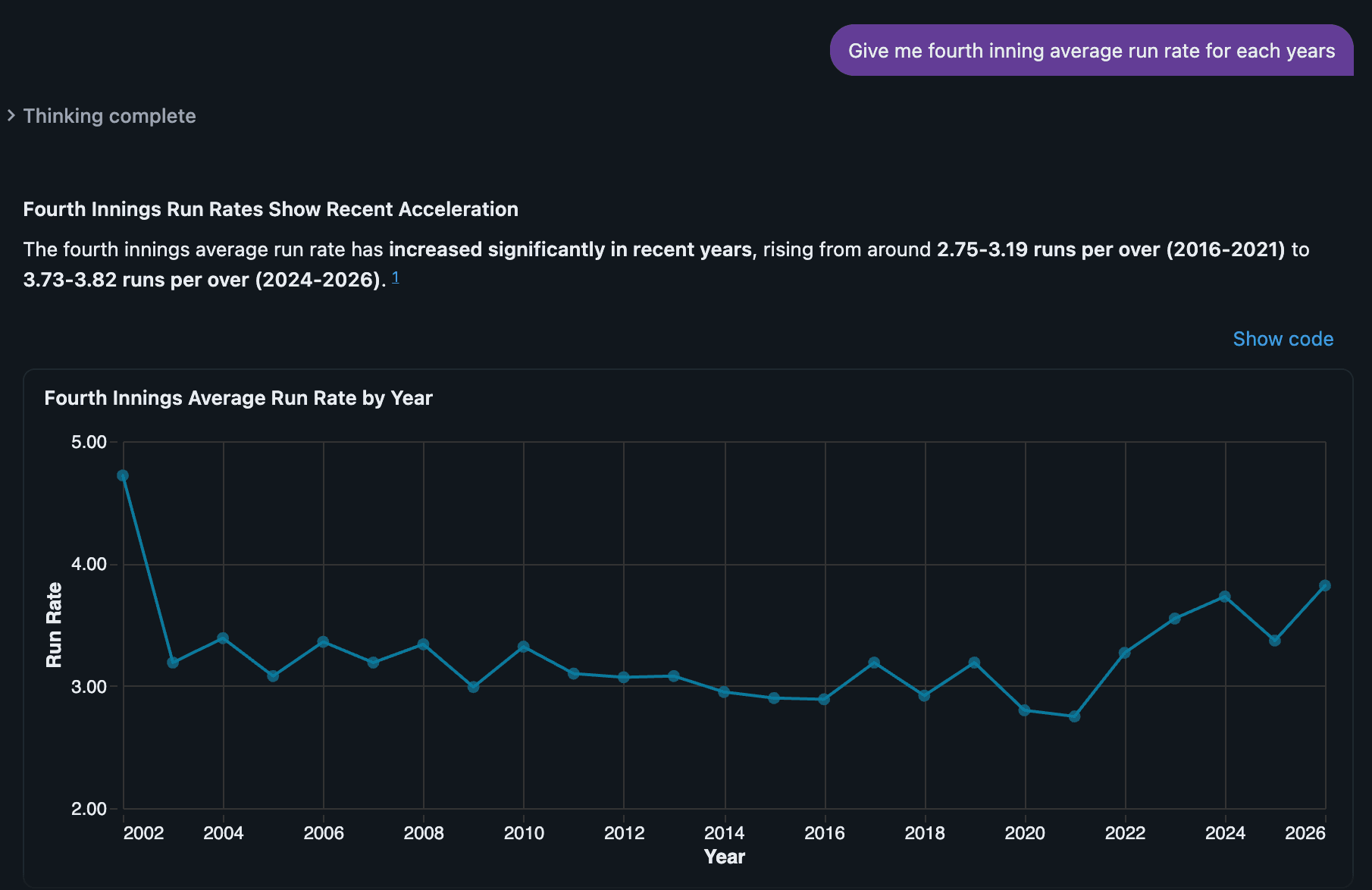
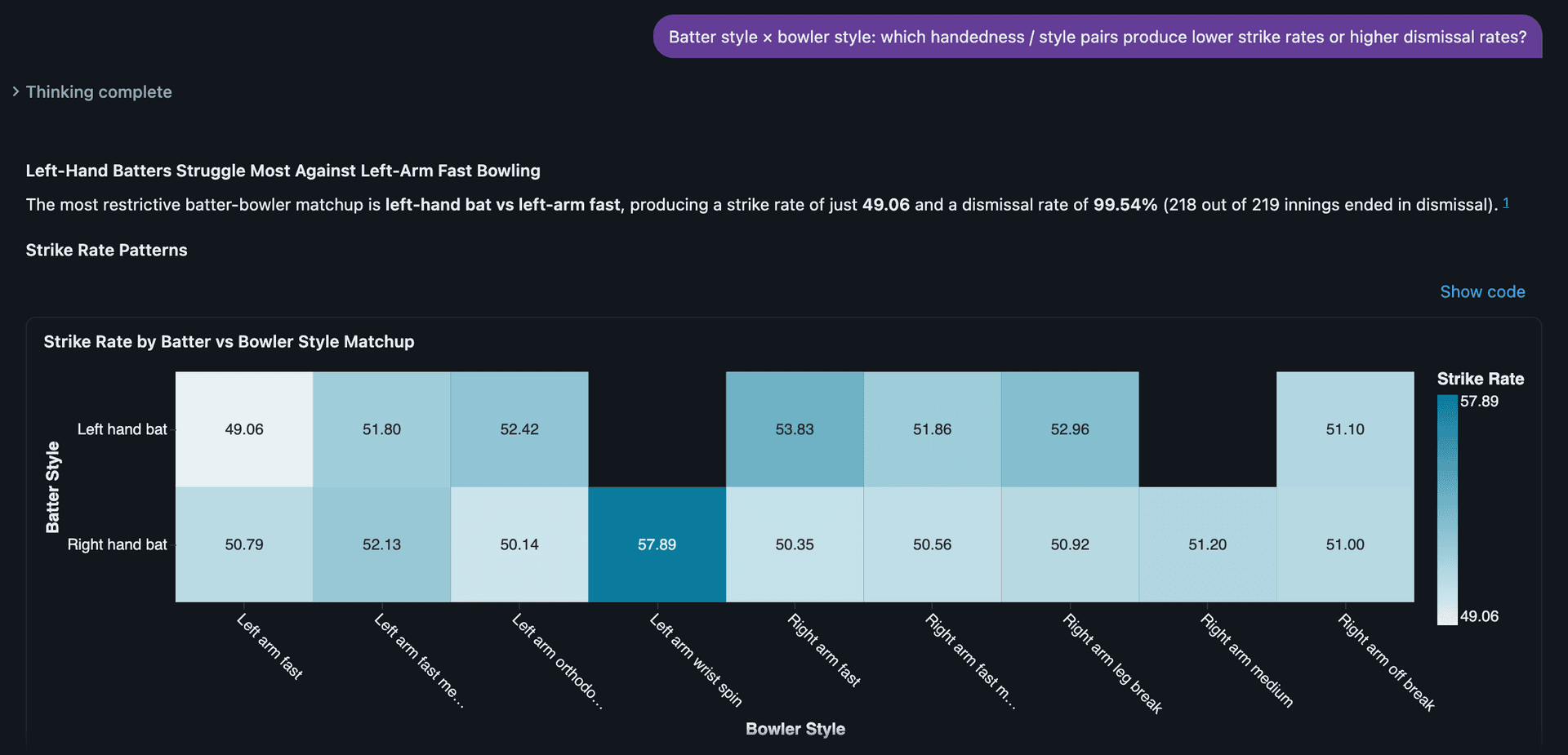
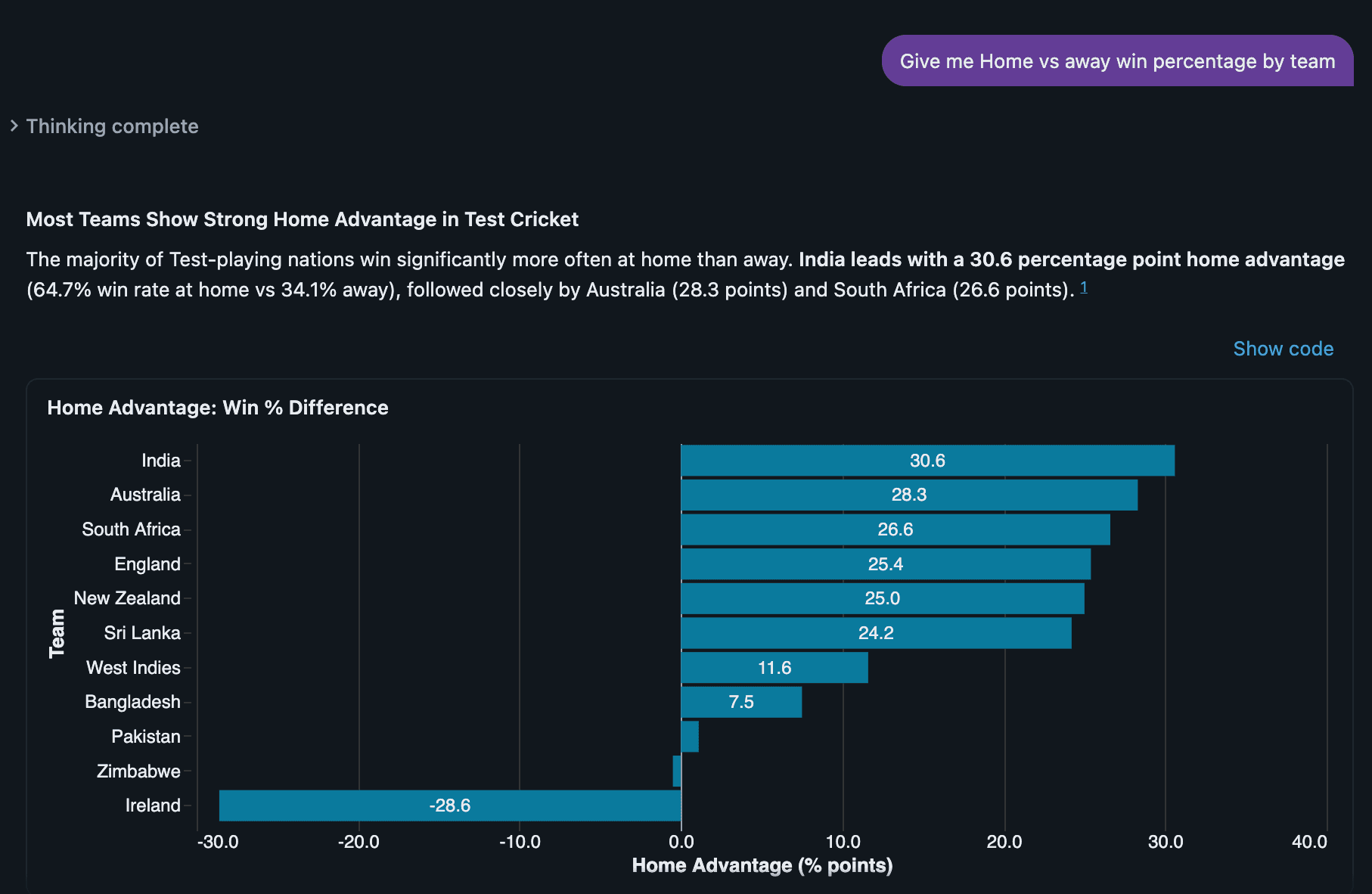
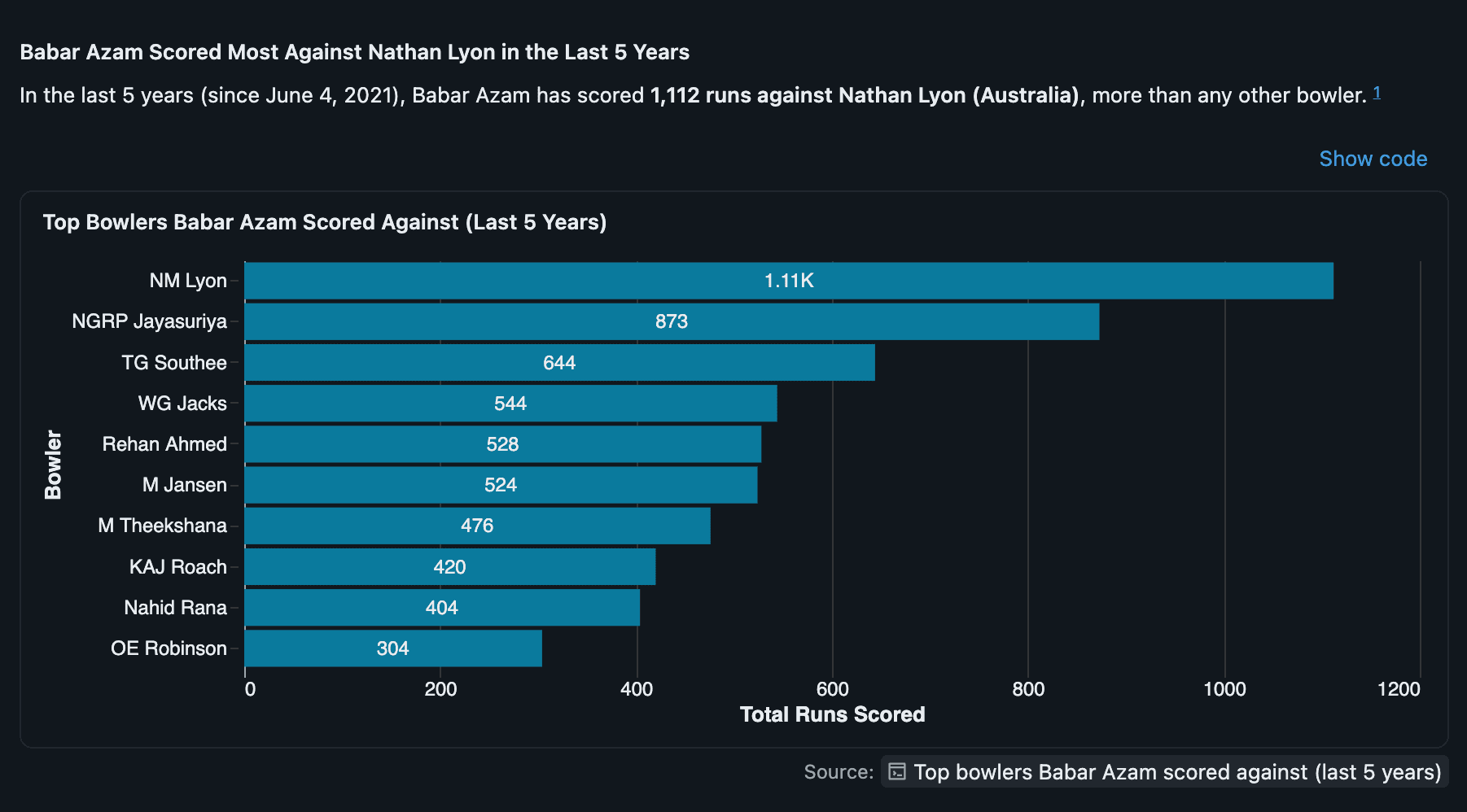
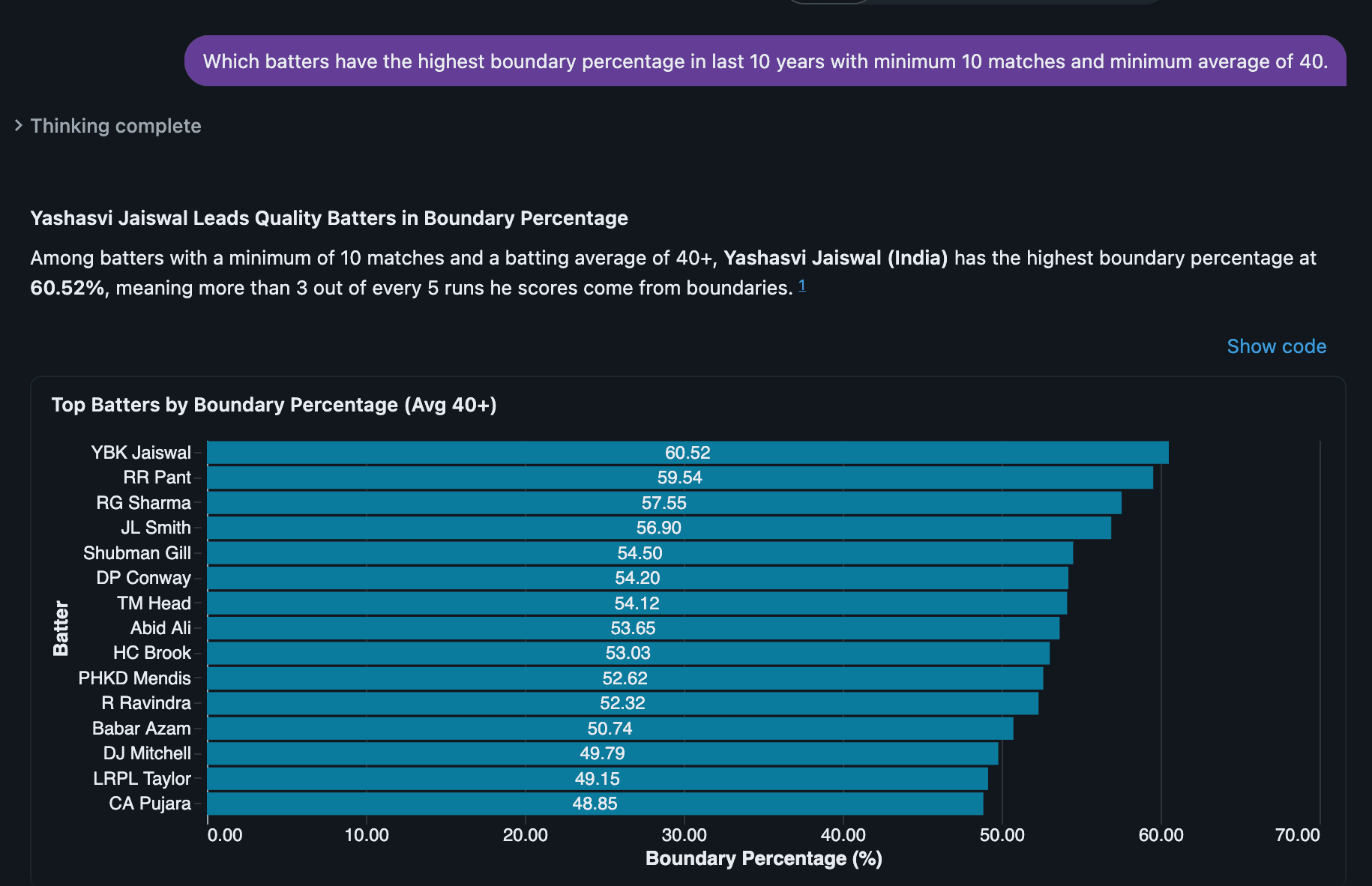
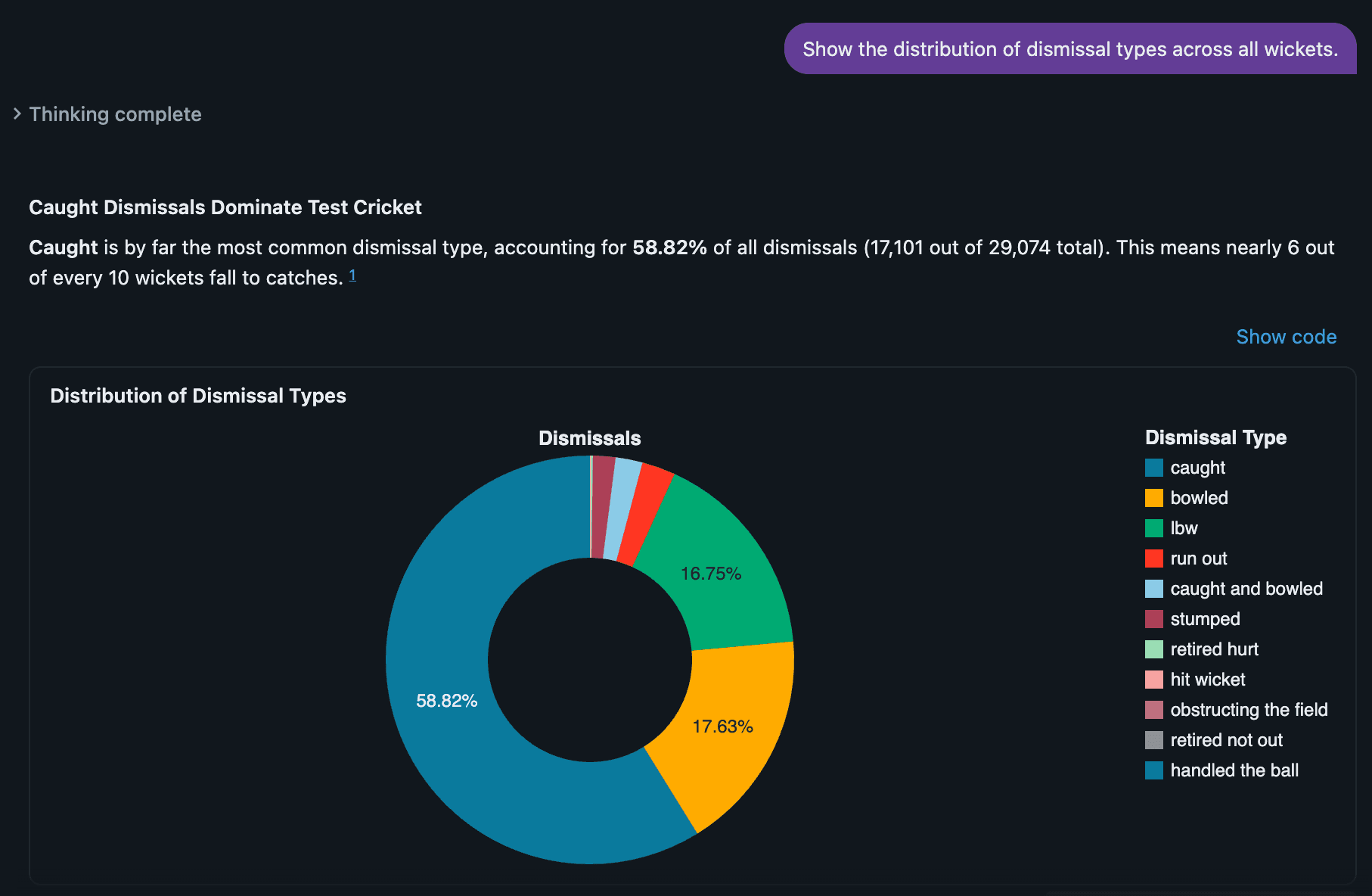
With Gold tables in place, cricket analytics questions become simple SQL rather than JSON archaeology:
- Career form: Who has the best strike rate and boundary percentage across formats?
gold.player_batting_statsanswers this directly, without re-parsing a single delivery. - Home advantage: Does a team really perform better at home?
gold.home_away_performancebreaks down win/loss/draw percentage by team, match type, and home/away/neutral context — turning a common cricket debate into a one-line query. - Bowling impact: Which bowlers dismiss top-order batters most often? Wicket attribution flows cleanly from ball-level dismissal data all the way through to
gold.player_bowling_stats. - Venue effects: Canonical venue mapping in
dim_venueslets analysts compare scoring rates and outcomes across grounds that Cricsheet itself records under slightly different names.
Because every Gold table traces back through Silver to an immutable Bronze snapshot, any insight can be audited, recomputed, or extended to new questions without re-ingesting a single match file.
Build Your Own Cricket Lakehouse
This project shows that a rigorous, production-style lakehouse doesn't require a large team or heavyweight infrastructure — just disciplined layering, sensible modeling choices (SCD Type 2 for players, true ball-by-ball grain for deliveries), and Databricks-native tooling for orchestration and governance.
If you want to build something similar:
- Clone the repository and configure the Databricks CLI against your workspace.
- Run
00_catalog_setupand01_catalog_permissionsto bootstrap Unity Catalog. - Deploy the bundle with
databricks bundle deploy --target dev. - Drop Cricsheet match JSON into the landing Volume and watch the file-arrival triggers take it from raw JSON to governed Gold tables automatically.
The full source — notebooks, job definitions, and bundle configuration — is openly available on GitHub at piestack-labs/databricks-cricket-analytics, structured for exactly this kind of reuse. Point it at a different sport's ball-by-ball or event-by-event data and the same Bronze → Silver → Gold skeleton still holds.